

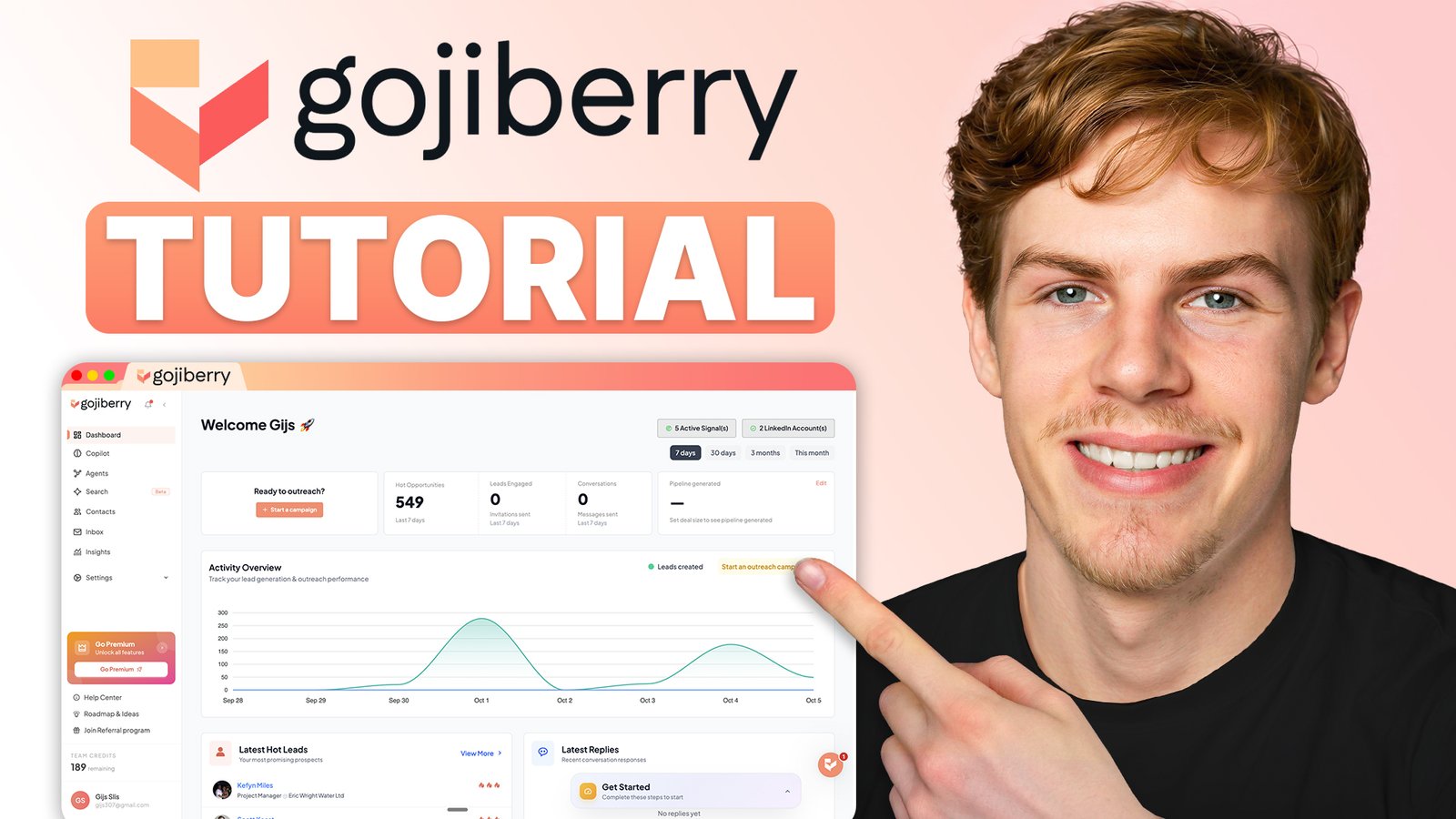
Gojiberry sponsored the video this guide is based on, and the Gojiberry links on this page are affiliate links: if you sign up through them I may earn a commission, at no extra cost to you. The pros and cons below are my own.
If you’re sending cold emails and LinkedIn messages and getting almost nothing back, this guide is for you. In this Gojiberry AI tutorial I’ll show you what the platform does and how to set it up from scratch, so you end up with an AI outreach agent that finds warm leads and contacts them for you, 24/7.
By the end you’ll also know whether it’s worth the $99 a month it costs.

Quick answer
Gojiberry AI finds people who match your ideal customer and are showing a buying signal right now, like a job change, a funding round or engagement with a competitor. It then runs personalized LinkedIn and email outreach to them in the background. Setup takes a few minutes, and for solo founders and small teams doing their own outreach, $99 a month is a great price for what you get. With the code OUTREACH, your first month is free.
Best for: solo founders, sales reps and small B2B teams who run their own outbound
Rather watch than read?
Follow along in the video below. I walk through every step on screen.
What is Gojiberry AI?
Most cold outreach tools, like Instantly or lemlist, are built around static lists. You scrape a bunch of people with the right job title and location, send them all the same message, and hope a small percentage replies. That used to work, because there wasn’t much competition in people’s inboxes. Now everyone does it, reply rates keep dropping, and most people can tell within one sentence that they’re getting a templated pitch.
Gojiberry does it differently. It only targets people who fit your job titles and are also showing some kind of buying signal right now. Gojiberry calls these intent signals, and it tracks more than 15 of them. A few examples:
- Someone just changed jobs
- Their company just raised funding or is hiring
- They’re commenting on posts about a topic related to what you sell
- They just engaged with a competitor’s page
The idea behind it is simple: warm leads reply more than cold leads. Gojiberry finds them, writes a personalized message for each one and sends it across LinkedIn and email, and you only handle the replies.
Gojiberry AI tutorial: setting up your agent
The whole setup takes about seven steps, and Gojiberry prefills most of it for you. The two steps that matter most are your ideal customer profile and your intent signals, so that’s where I’d spend most of your time.
Step 1: Sign up and add the OUTREACH code
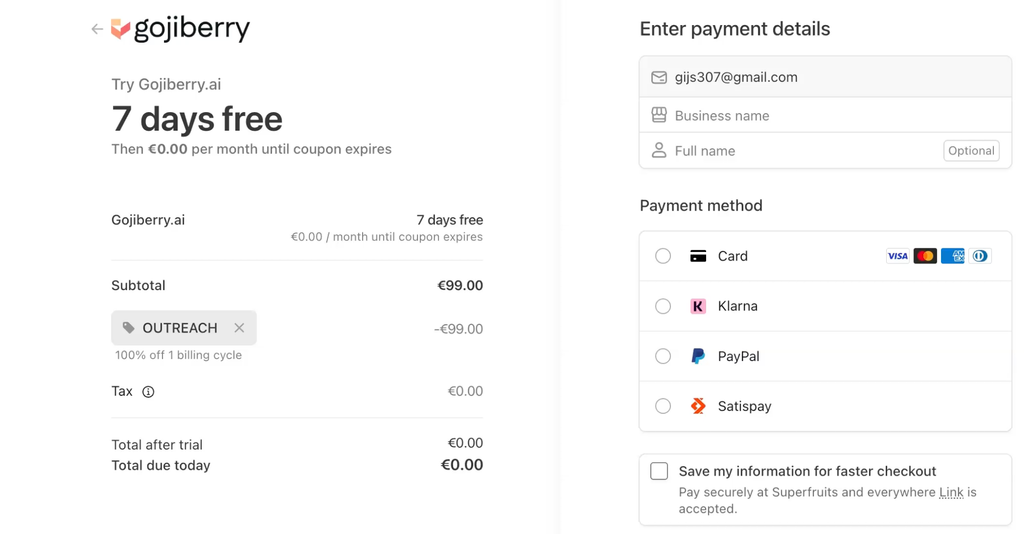
Go to Gojiberry through this link and click Start for free. You get a 7-day free trial.
In the billing section, add the promo code OUTREACH. It gives you your first month completely free once the trial is over. The code is for monthly billing: quarterly and annual billing already come with their own discount, so the code doesn’t apply there.
Step 2: Let Gojiberry read your website
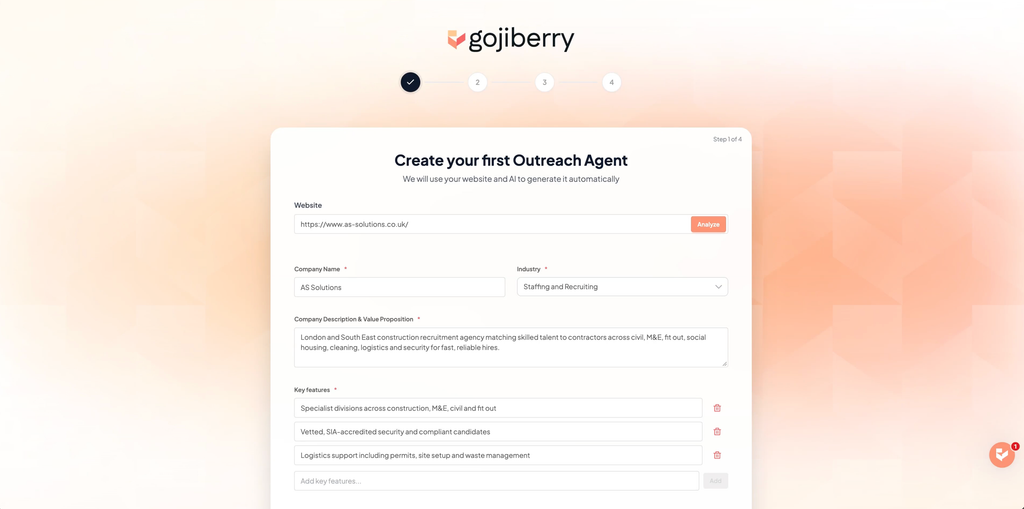
After you fill in your billing details, Gojiberry asks for your website link. This matters more than it looks. The AI scans your site and pulls out your key features, your value proposition and your social proof, and it uses all of that later to write your outreach messages for you.
Enter your website and click Analyze. Once it has pulled your information, check that it’s correct and click Next step.
Step 3: Choose your channels and connect your accounts
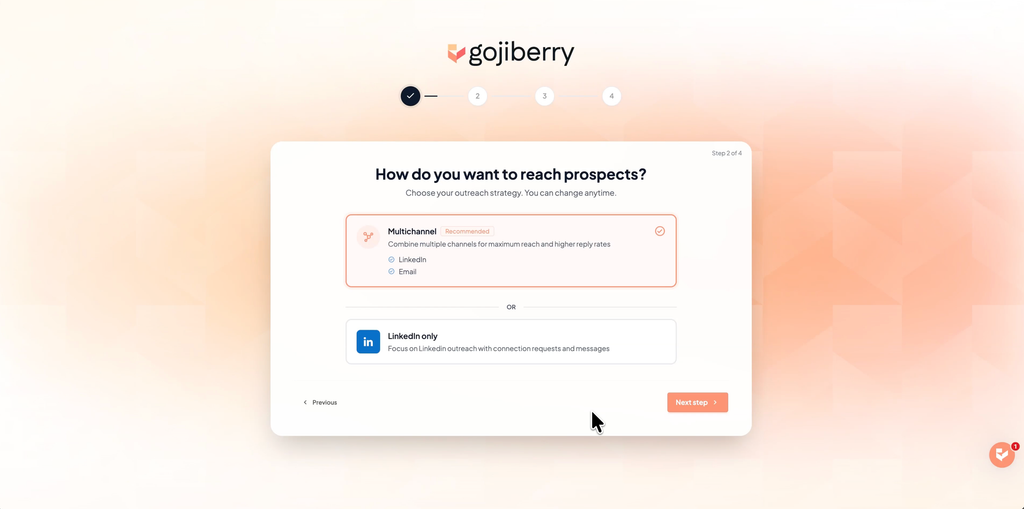
Next you choose between Multi-channel and LinkedIn only. Multi-channel is recommended because it gets higher reply rates, so that’s what I picked.
Then select where you’re located and connect your LinkedIn account and your email account. You don’t need a professional domain for this: a regular Gmail or Outlook account works.
Step 4: Pick a campaign goal and message tone
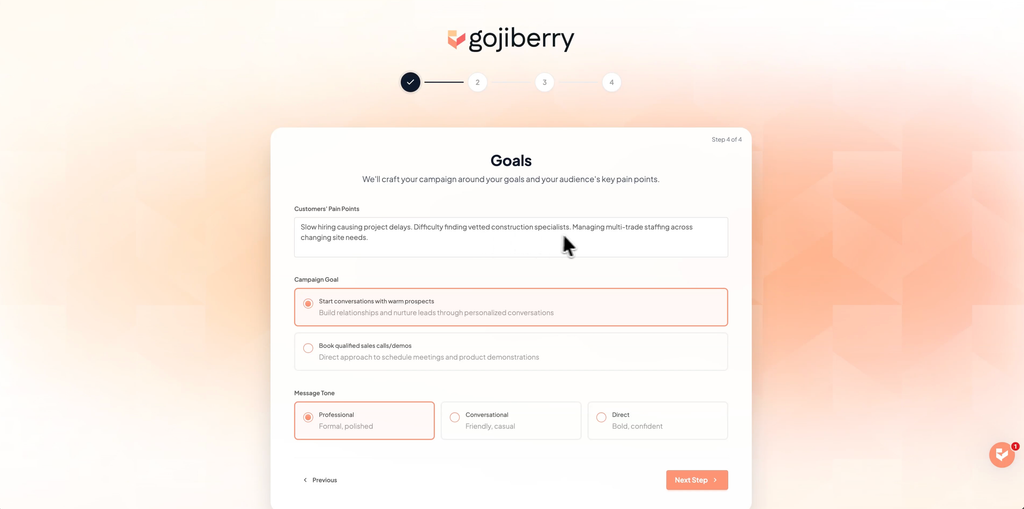
Gojiberry now shows your customers’ pain points, which it already pulled from your website. Below that you pick a campaign goal: either starting conversations with warm prospects, or booking sales calls and demos directly.
Then pick a message tone: professional, conversational or direct. This doesn’t change your targeting at all. It only changes the style of the messages and how pushy the call to action is.
Step 5: Set up your ideal customer profile
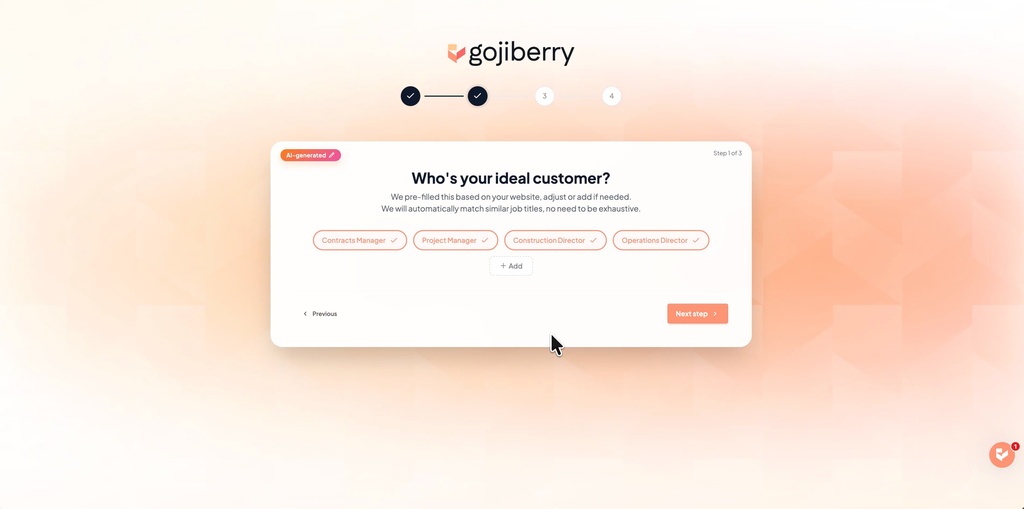
This is the part that matters most in the entire platform, so make sure you get it right. Your ideal customer profile (ICP) decides who Gojiberry goes after. It’s prefilled based on your website, but you want to go through it and confirm or edit everything:
- Job titles: you’ll find these under Who’s your ideal customer. For my example business it pulled contracts manager, project manager and construction director straight from the website. Click Add to get more suggestions; I added operations director.
- Target industries and locations
- Company types: private, public, startup, or whatever applies
- Company size
Keep in mind that the narrower your targeting, the fewer leads you get. If you only want VPs of sales at biotech companies with 10 to 50 employees in New Zealand, you’ll get almost nothing. My advice: start a bit broader than you think you need, see what comes in, and tighten it up once you can judge the quality of the leads.
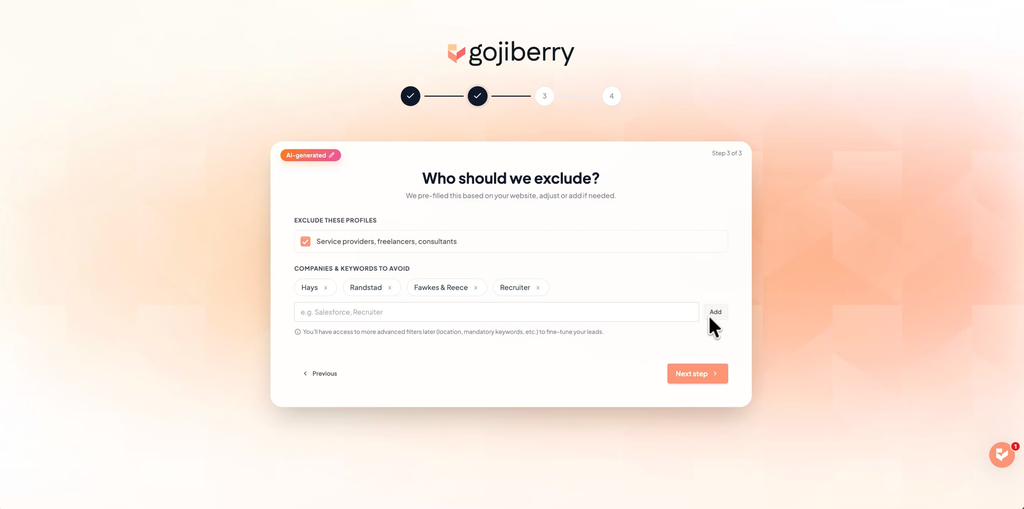
You can also exclude people like service providers, freelancers and consultants, and add companies or keywords to avoid. Gojiberry prefilled this with Hays and a few other companies for me, which makes sense, because you don’t want to pitch your own competition. I also added recruiter.
Step 6: Choose your intent signals
Once your ICP is set, you move on to intent signals. Gojiberry suggests a few based on your business. For me it picked these two:
- Top 5% most active profiles in your ICP: people who post and engage a lot on LinkedIn, so they’re more likely to see your message.
- Recent job changes in the last 90 days: people who just started a new role often make new buying decisions.
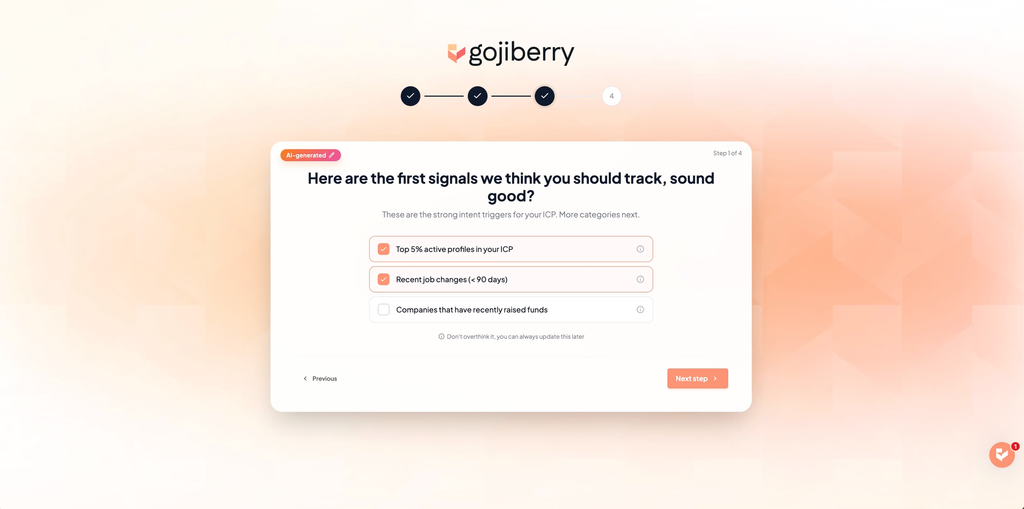
There’s also companies that recently raised funds, which I’d turn on if you sell to growing companies.
Then add keywords: topics related to your industry or your customers’ pain points. Gojiberry tracks who’s engaging with posts about them. Don’t go too broad here. Just “AI” isn’t going to tell you anything, but “AI lead generation” or “cold outreach” is specific enough.
Finally, add your competitors. Type in a competitor’s company and Gojiberry finds people interacting with them on LinkedIn.
Step 7: Preview your leads and launch your agent
Gojiberry now shows a summary of your whole ICP to check, followed by a small preview of leads it found. If one doesn’t fit, reject it. If they look right, click Launch my agent and it starts running in the background, 24/7.
In my opinion this is the most valuable thing about the whole platform: you’re not building lead lists by hand anymore. Within about 5 minutes of launching, my agent had already found 352 leads, 184 from the top 5% signal and 168 from recent job changes. It keeps checking those signals and adds new warm leads to your account every day, without you touching anything.
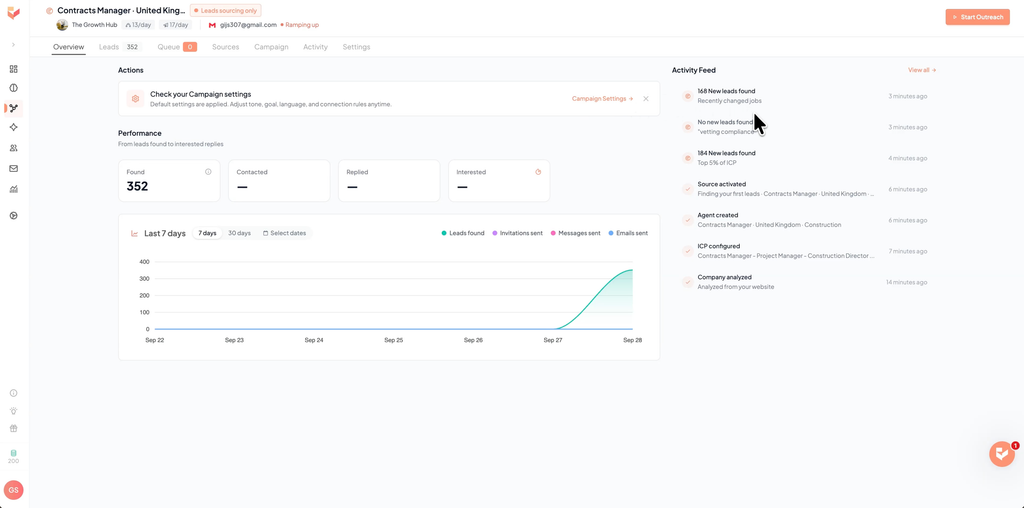
According to Gojiberry, the agent also gets better over time. It tracks what converts and what doesn’t, adjusts every week, and benchmarks your campaign against top performers in your industry. So think of it less as a tool you set up once, and more as a new hire who gets better at the job the longer they’re there.
How to get more leads: add lead sources
If you want more leads, open the Sources tab in your agent overview. It shows how many signals are active; mine said 5 out of 15. You need at least 4, but I’d aim for roughly 10 to 12 for the best results. With fewer than that, it takes a while to find leads.
Click Add lead source and you get these options:
- High intent signals: more on these below.
- Warm lookalike audience: upload a list of your best customers and Gojiberry goes out and finds more people like them.
- Manual upload: a CSV file of your own leads.
- An existing lead list, or an import from LinkedIn directly.
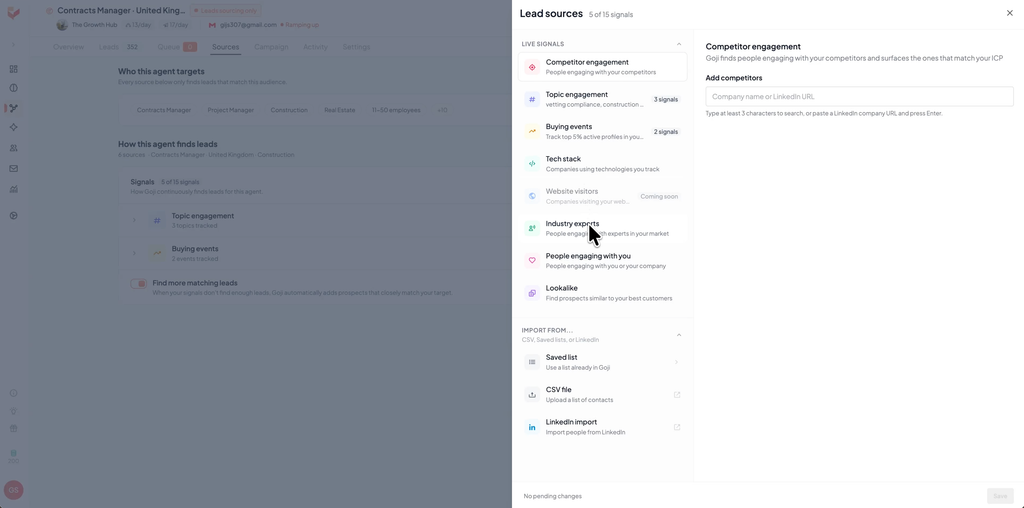
Under high intent signals you’ll find:
- Keyword engagement: people engaging with posts about your keywords, which we already covered.
- People engaging with your market: add the LinkedIn profiles of experts, creators or influencers in your space, and Gojiberry finds people engaging with their content.
- Company and competitor engagement.
- People aware of your brand: people interacting with your own profile, your company page followers and, if you have LinkedIn Premium or Sales Navigator, your profile visitors.
- Buying events: funding rounds and companies with open roles.
- Tech stack (still in beta): companies using specific tools, like Shopify or WordPress.
I use a mix, a couple from each category rather than stacking one type, and I leave Smart lead finder turned on. It automatically finds more warm leads whenever your signals are running low.
How Gojiberry scores your leads
In the Leads tab, every lead gets a score of one to three flames, based on how well they match your ICP and how strong the intent signal is. You can see exactly which signal triggered each lead, enrich their email address or phone number, and reject leads that don’t fit.
If you want to go further, enrich the phone number of your hottest leads and give them a call. That costs 10 credits per number, so I’d save it for your three-flame leads.
Your outreach campaign
Gojiberry already built a campaign for you when it launched your agent. Open the Campaign tab to see it. Because I picked multi-channel, mine has seven steps across LinkedIn and email:
- A connection invite
- A LinkedIn message, 3 days later
- An email, 2 days after that
- A profile visit
- A follow-up message
- A follow-up email
- A closing message
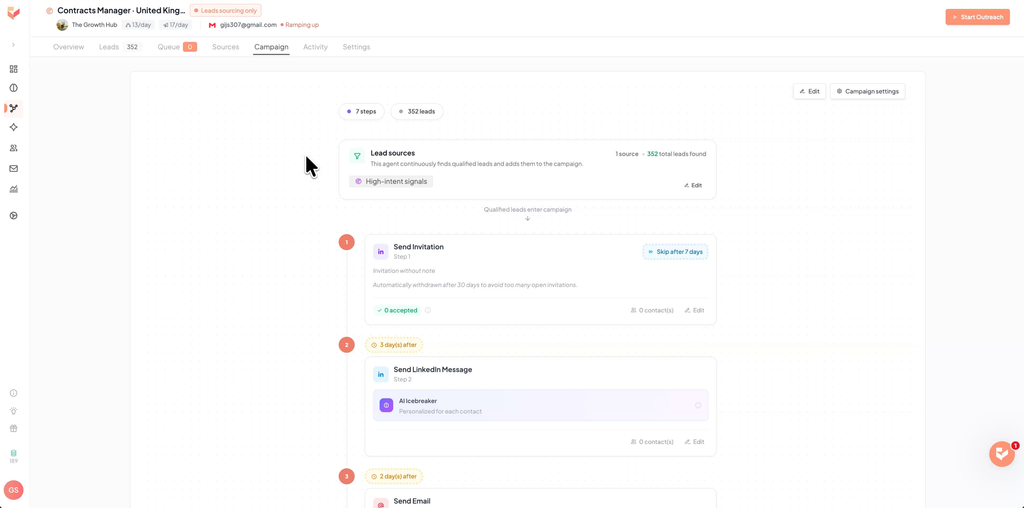
The invite goes out without a note by default, which is what you want, because a blank invite gets accepted more often than one with a pitch attached. If someone doesn’t accept within 7 days, Gojiberry skips them, and it withdraws the invite after 30 days so you don’t pile up open invitations.
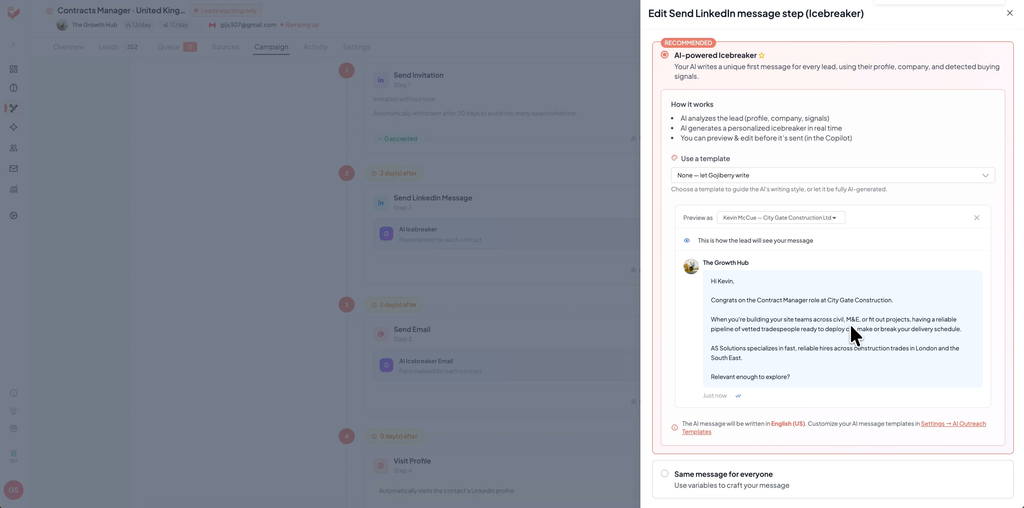
The first message is an AI icebreaker. Gojiberry writes a unique message for every single lead based on their profile, their company and the exact signal that triggered them. If someone just changed jobs, the message mentions that. If they engaged with a specific post, it mentions that instead. Click Edit and then Generate preview to see an example.
If you want more control, open the template dropdown and create your own template. Choose LinkedIn or email, then icebreaker, follow-up or closing. Write your structure with variables and add AI instructions if you want. On the right you can preview it on one of your real leads, and Gojiberry still personalizes each message around your structure.
For your follow-ups, keep them short: under 60 words is a good rule of thumb. The strongest follow-up offers something of value, like a short resource or a case study, instead of just “following up” or “circling back”, which everyone’s inbox is already full of.
Once you’re happy with it, go back to the agent and click Start outreach. The Queue tab shows exactly what goes out next.
Your day-to-day workflow
Once your campaign is live, there are three things to check:
- Dashboard: new leads and activity.
- Copilot: set to autopilot by default. Switch it to review and you see each contact and each message Gojiberry wrote for them, and you approve or reject it before anything is sent. That’s good if you want more control early on.
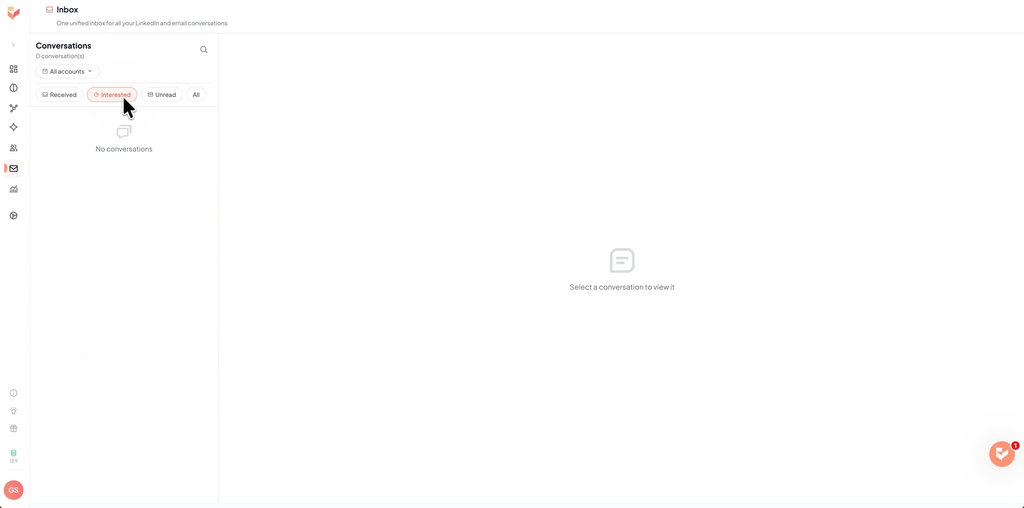
- Inbox: every LinkedIn and email reply lands in one place, and you can filter by who’s marked as interested, so you’re not digging through your entire LinkedIn inbox. When someone replies, Gojiberry already drafts a response you can send in one click.
That’s the core process: the agent finds leads, the campaign reaches out, and you handle the replies in the inbox.
Other features worth knowing
- Email waterfall enrichment: finds and validates email addresses for your leads using more than 15 data providers, automatically. It runs on credits shared across your whole team. One email costs 1 credit, a phone number costs 10, and your credits refill every month.
- Search: describe the leads you’re looking for in plain English, or use filters, to search a database of almost 800 million contacts.
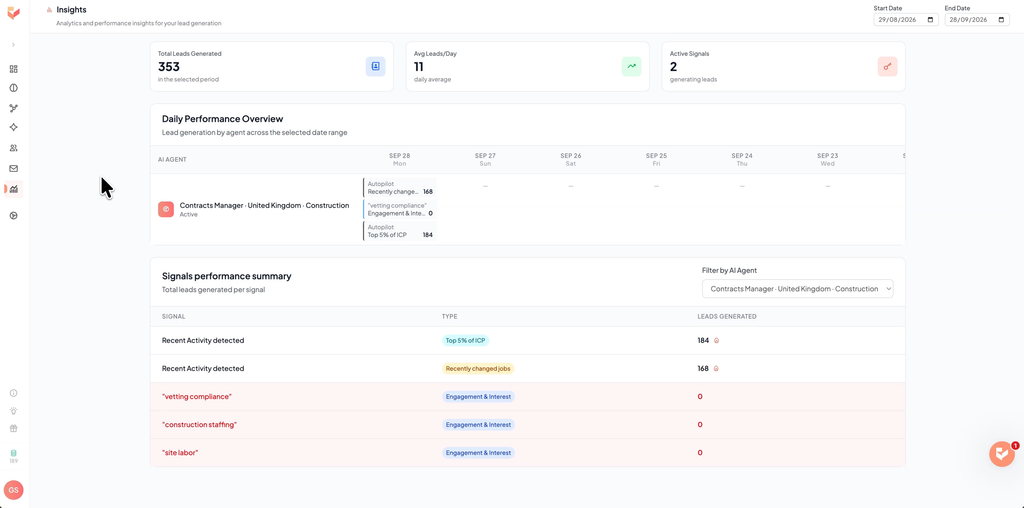
- Insights: your total leads generated, average leads per day and active signals, plus a day-by-day breakdown per agent. My favorite part is the summary of how many leads each signal generated, so you can see which signals work and swap out the ones that don’t.
- Integrations: HubSpot, Pipedrive, Salesforce, Zoho, Slack, Zapier and more, plus an API and an MCP server. With the MCP server you can even connect Gojiberry to Claude and manage your leads through a chat instead of the dashboard.
- Support: live chat if you get stuck.
Gojiberry pricing
| Plan | Price per month | What’s included | Best for |
|---|---|---|---|
| Pro | $99 | 2 AI agents prospecting 24/7, up to 1,800 prospects contacted a month, 2 LinkedIn seats, 100 credits a month, unified inbox, lead scoring, AI Copilot, waterfall enrichment, CRM, API and MCP integrations, live chat support | Solo founders and small teams doing their own outreach |
| Custom | On request | Everything in Pro, plus a custom number of agents and prospects, more senders, a dedicated customer success manager, and admin access with a team view | Sales teams of 3 or more and outbound agencies |
Prices checked on October 17, 2026. Quarterly and annual billing come with their own discount, and extra LinkedIn seats or AI agents cost $49 a month each. See the official pricing page for current prices.
If you’re a solo founder or a small team doing your own outreach, $99 a month is, in my opinion, a great price for what you get. Especially compared to running a cold email tool plus a separate lead database plus a separate personalization tool, which is what a lot of people were stitching together before something like this existed.
For bigger sales teams or outbound agencies there’s the Custom plan, but its pricing isn’t published, so you’ll need to talk to Gojiberry’s team to get the real numbers.
Since I recorded the video, Gojiberry has added website visitor identification to the Pro plan and now offers the Custom plan to teams of three or more.
Pros and cons
Pros
- Targets warm leads from 15+ buying signals instead of static lists
- Found 352 leads within 5 minutes in my test, and keeps going 24/7
- Every message is personalized around the signal that triggered it
- LinkedIn and email in one sequence, with one shared inbox
- Works with a regular Gmail or Outlook account
- Review mode lets you approve every message before it goes out
- MCP server, so you can manage leads from Claude
Cons
- Narrow targeting can leave you with very few leads
- Works best with 10 to 12 active signals, so setup takes some thought
- No free plan: $99 a month after the 7-day trial
- Phone numbers cost 10 credits each, and Pro includes 100 credits a month
- Custom plan pricing isn’t published
- The tech stack signal is still in beta
Who Gojiberry is for
- Solo founders: you get a prospecting agent and a multi-channel campaign without building lists or writing every message yourself.
- Sales reps and small B2B teams who run their own outbound and want warmer leads than a scraped list.
- Anyone paying for a cold email tool, a lead database and a personalization tool separately: Gojiberry covers all three in one plan.
Who should skip it
- Very narrow niches: if your whole market is a few hundred people, signal-based targeting may find too few leads to be worth $99 a month.
- Bigger teams on a fixed budget: three or more senders means the Custom plan, so get a quote before you plan around it.
Final verdict
Gojiberry turns cold outreach from blasting static lists into reaching people who are showing a reason to buy right now. Setup only takes a few minutes, but spend most of that time on your ICP and your signals, because they decide everything that comes after. Once it’s running, the agent finds leads, the campaign reaches out, and you only handle the replies.
For a solo founder or a small team doing their own outreach, I think it’s well worth the $99 a month. Sign up through the button below and use the code OUTREACH to get your first full month for free.
FAQ
How much does Gojiberry AI cost?
The Pro plan is $99 a month and includes 2 AI agents prospecting 24/7 and up to 1,800 prospects contacted a month. Teams of three or more can ask for a Custom plan, which has no published price.
Does Gojiberry have a free trial?
Yes, you get a 7-day free trial. Add the code OUTREACH in the billing section at signup and your first month on monthly billing is free once the trial ends.
What are intent signals in Gojiberry?
Signs that someone may be ready to buy, like a recent job change, a funding round, open roles, or engaging with posts about your topic or with a competitor. Gojiberry contacts people who match your ICP and show one of these signals.
Do I need a professional email domain for Gojiberry?
No. You can connect a regular Gmail or Outlook account, along with your LinkedIn account.
Does Gojiberry send messages without my approval?
By default, Copilot runs on autopilot. Switch it to review and you approve or reject every message before it’s sent.
Can I connect Gojiberry to Claude?
Yes. Gojiberry has an MCP server, so you can connect it to Claude and manage your leads through a chat. It also has an API and integrations with HubSpot, Pipedrive, Salesforce, Zoho, Slack and Zapier.
Related articles
-

lemlist vs Waalaxy (2026): Which Outreach Tool to Pick?
lemlist is a full multichannel outreach platform; Waalaxy is LinkedIn-first. If LinkedIn is your main channel and email is a small bonus,…