


Emergent did not pay for this review and had no say in it. The Emergent links on this page are affiliate links: if you sign up through them I may earn a commission, at no extra cost to you. It never changes my verdict.
Emergent says it reached $100 million in annual recurring revenue just eight months after launch, which makes it one of the fastest-growing AI app builders out there. So is it worth the hype? When I went looking for answers, almost every Emergent AI review I found on YouTube was sponsored by Emergent. That’s why I made my own, without anyone paying for it.
Instead of a basic to-do list app, I asked Emergent to build a working CRM similar to monday.com, then pushed it with a much harder follow-up. Here’s what worked, what didn’t, and what it actually cost.

Quick verdict
Emergent is an AI app builder that turns a prompt into a working web or mobile app, with hosting included. In my test it built a functional CRM in under 20 minutes for less than 40 credits, and it handled a complex follow-up without breaking what already worked. It won’t replace a development team for a large product, but for validating an idea and getting your first users, I’d recommend it.
Best for: founders, entrepreneurs and creators who want to build and test an app idea without coding or hiring developers.
Watch my Emergent AI review
What is Emergent?
Emergent is an agentic “vibe coding” platform. You describe the app you want in plain words, and a team of AI agents builds it for you: one plans and writes the code, a design agent handles the look, and a testing agent checks everything and sends problems back to be fixed. You can build a full-stack web app, a mobile app or a landing page, and when you’re done, Emergent hosts and deploys it for you.
How I tested it: building a monday.com-style CRM
I gave Emergent one detailed prompt: build a CRM similar to monday.com, with companies, contacts, deals, a drag-and-drop sales pipeline, activity tracking for calls, meetings and tasks, a dashboard showing revenue and deal progress, filters, custom columns, list and kanban views, and simple automations. I also uploaded a few screenshots of monday.com as design reference. That was purely to test Emergent; I’m not launching this app, and I’d never recommend copying another company’s product.
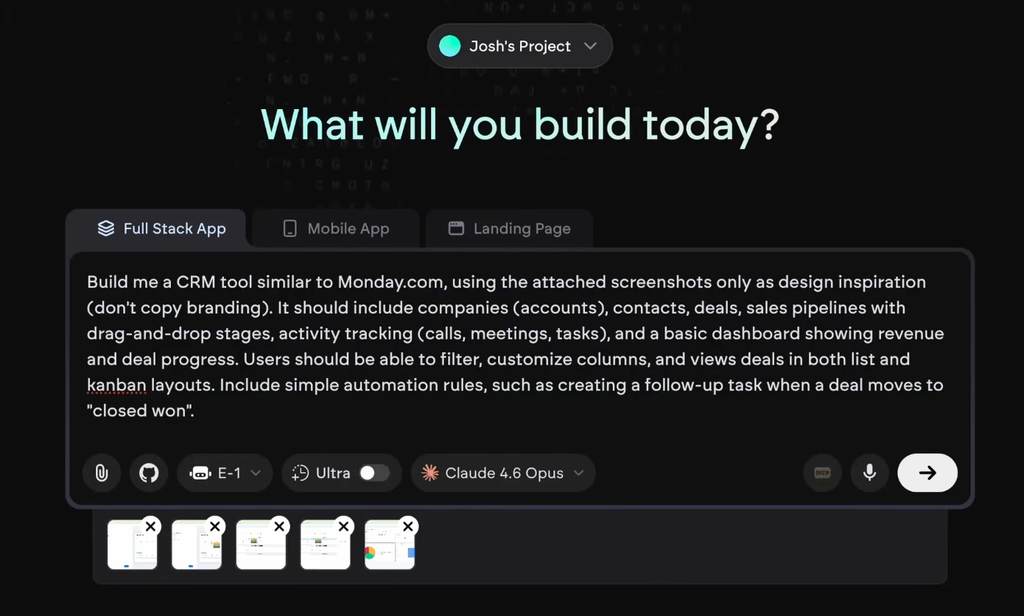
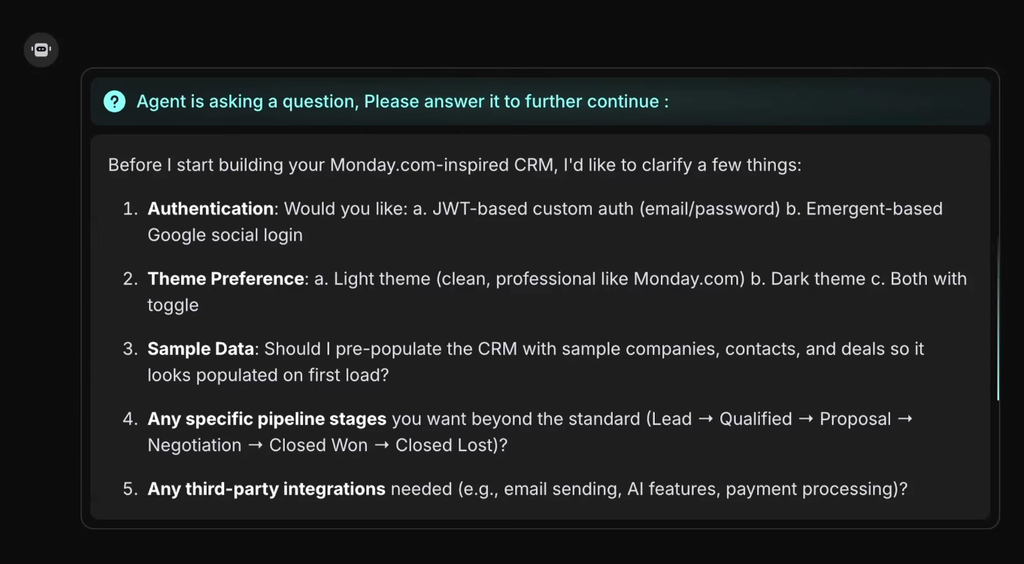
My exact prompt, with screenshots attached as design reference.Two things stood out before a single line of code was written. First, you can choose which AI model does the work, and Emergent had the newest Claude Opus model available within weeks of its release. Second, instead of running with my prompt, it asked clarifying questions: how users should log in, light or dark theme, whether to add sample data, whether pipeline stages should be customizable, and which integrations I needed. Most AI app builders skip this step and miss details as a result.
The first version worked. I could sign up with Google, add a company, and create a deal that was correctly linked to that company, which shows the database relationships were set up properly. The one gap: pipeline stages only appeared after I clicked “load sample data” in the settings. I asked Emergent to load that data automatically for new accounts, created a fresh account, and it worked, without breaking anything else. That matters, because changing existing code is where most AI builders fall apart.
With the data in, the companies and contacts sections were clean and usable, the kanban pipeline supported smooth drag and drop, and the activities section let me tick off tasks. The interface was colorful and genuinely looked good.
The hard test: a visual automation builder
Up to that point I’d gone easy on it. The automation settings exposed a real problem: rules had to be written as JSON, which is far too technical for most people. So I asked Emergent to build a full visual automation builder with ready-made templates.
About two minutes later, it was done. The new builder had a list of templates and a simple “when this happens, do this” structure. I tested the template “when a deal moves to Proposal sent, create a task”, moved a deal into that stage, and a “send proposal” task appeared in the activities section for that company. For me, that was the moment it proved it could handle real app logic.
To be fair, the result isn’t as good as the actual monday.com CRM, which has years of polish, built-in integrations and AI features. But I built this in under 20 minutes, and everything up to this point cost less than 40 credits.
Emergent pricing
| Plan | Price per month | Credits per month | Best for |
|---|---|---|---|
| Free | $0 | 10 | Trying it out |
| Standard | $20, or $17 billed yearly | 100 | Most people building their first apps |
| Pro | $200, or $167 billed yearly | 750 | Heavy users who want custom agents, a 1M token context window and system prompt editing |
| Business and Enterprise | Custom | Custom | Teams that need SSO, shared workspaces and admin controls |
Everything you do in Emergent uses credits, and you can buy extra credits on paid plans. My whole CRM build used less than 40 credits, which works out to around $7 to $8. Deploying an app so it’s live on the internet cost 50 credits per month when I tested it, roughly $10, and that covers hosting, API key management and security. For most people starting out, the Standard plan is enough.
Prices checked on September 28, 2026. See the official pricing page for current prices.
Key features
- Clarifying questions: Emergent asks what you actually want before it builds, which led to a better first version than a prompt alone would.
- Choice of AI model: you pick the model that builds your app, including the latest Claude models. When I tested it, that was a clear advantage over tools like Lovable.
- Testing agent: a separate agent tests what the others build and sends back anything that breaks. In my test, changes didn’t break existing features.
- Image references: you can upload screenshots as design inspiration, and the result followed them closely.
- Talk to specific agents: you can see what each agent is doing and send it extra instructions while it works.
- Built-in login, payments and hosting: Google sign-in was one of the setup options, it walks you through connecting Stripe step by step, and deploying takes one click.
Pros and cons
Pros
- Built a working CRM in under 20 minutes
- Asks clarifying questions before building
- Changes didn’t break existing features
- You choose the AI model
- Efficient with credits for what it builds
- Hosting and deployment included
Cons
- Emergent watermark on your app, with no simple button to remove it
- Free plan only gives 10 credits a month
- Keeping an app live costs credits every month
- Not as polished as mature software
- Some defaults are technical, like JSON automations
Who Emergent is for
- Founders validating an idea: you can build a working version and put it in front of real users before spending anything serious.
- Non-technical entrepreneurs: no coding and no $50,000 upfront for a development team. The skill that matters becomes picking the right idea and marketing it.
- Creators who want their own tool: the easiest app idea to validate is one you want yourself, because plenty of people in your position likely want it too.
Who should skip it
- Anyone expecting a finished, large-scale product: Emergent gets you started fast, but once you have real traction and paying users, it can be worth bringing in developers to polish and scale your app.
- People who want fixed, predictable costs: building, changes and hosting all use credits, so heavy use means buying more.
Common complaints: the watermark and credits
The watermark. Apps built with Emergent show an Emergent watermark, and it’s a bit annoying that there’s no simple switch to turn it off. The fix is easy though: ask the chat to remove it, and it does.
Credit usage. A common criticism is that Emergent burns through credits. In my experience it was better than other AI app builders I’ve tried: a fairly complex CRM with an automation builder cost me less than 40 credits. Your usage depends on how much you build and change, so start on Standard and see how far 100 credits gets you.
Final verdict
Can you build a real app with Emergent? In my opinion, yes. You probably won’t build the next billion-dollar software company with Emergent alone, but for getting started, validating ideas and getting your first paying users, it’s excellent. Before tools like this, you had to learn to code or pay a development team tens of thousands of dollars. Now you can build it yourself for about the price of a streaming subscription.
I recommend it, and I can say that with a clear conscience because Emergent didn’t pay for this review.
FAQ
Is Emergent free?
Emergent has a free plan with 10 credits per month, which is enough to try it out. To build a full app like the CRM in this review, you’ll want the Standard plan at $20 per month with 100 credits.
How much does Emergent cost?
Standard costs $20 per month ($17 billed yearly) with 100 credits, and Pro costs $200 per month ($167 billed yearly) with 750 credits. Business and Enterprise plans have custom pricing. Keeping a deployed app live cost 50 credits per month when I tested it.
Is Emergent legit and worth it?
Yes. In my unsponsored test it built a working CRM with a sales pipeline, activity tracking and a visual automation builder in under 20 minutes, for less than 40 credits. It’s worth it for building and validating app ideas, less so if you expect a polished large-scale product without any developers.
Can you remove the Emergent watermark?
There’s no simple button for it, but you can ask the Emergent chat to remove the watermark from your app and it will.
Is Emergent better than Lovable?
Emergent has two clear advantages over Lovable in my testing: you can choose which AI model builds your app, and a dedicated testing agent checks the work and fixes what breaks. Which one suits you best depends on what you’re building.