

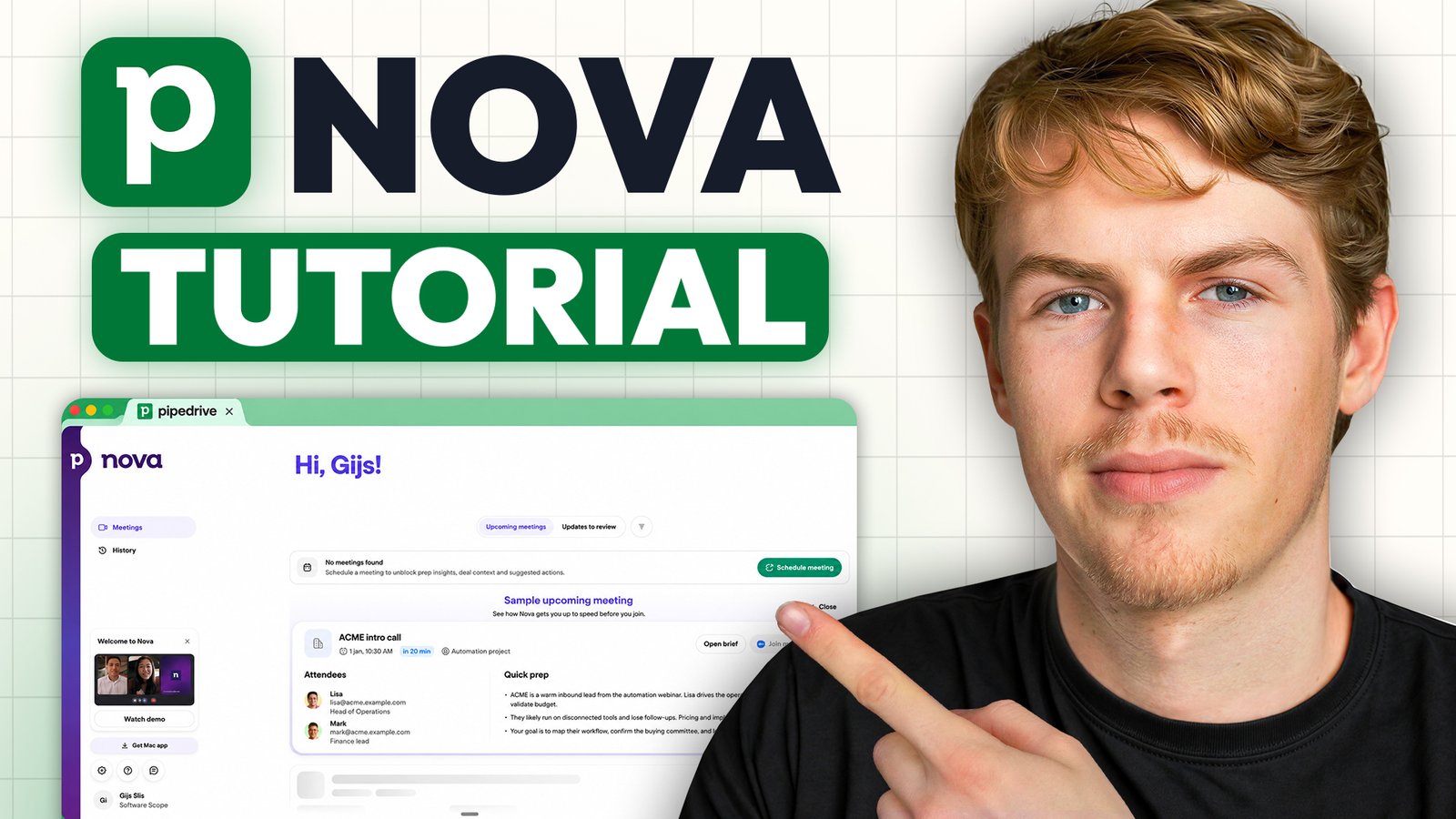
Pipedrive sponsored the video this article is based on, and the Pipedrive links on this page are affiliate links: if you sign up through them I may earn a commission, at no extra cost to you. The opinions, including who Nova isn’t for, are my own.
If you run a sales team and half your day seems to disappear into admin instead of selling, this one’s for you. In this review I walk through Pipedrive’s new AI meeting intelligence feature, Nova: what it does, how it works in practice, and whether it’s worth turning on for your team.

Quick answer
Pipedrive Nova is an AI meeting assistant built into Pipedrive, included on every plan at no extra cost. It works in three stages:
- Before the call, it builds a brief from your deal history, emails and recent activity
- During the call, it records and transcribes, through a notetaker or a desktop app that nobody sees
- After the call, it writes a summary and next steps, and suggests CRM updates that you approve
My verdict: if you do sales calls or online meetings, turn it on. If your selling mostly happens in person, it adds much less.
Through my link: a 30-day free trial and 20% off your first year.
Rather watch than read?
I run a live demo call with Nova in the video below.
What is Pipedrive Nova?
Nova is Pipedrive’s built-in meeting intelligence tool, and it’s aimed at a real problem. In Pipedrive’s 2026 CRM Trends Report, 42% of the 1,000 sales and marketing professionals surveyed said they spend at least 40% of their working day on tasks that don’t directly bring in revenue. Think of digging through emails before a call, writing meeting notes, and updating deals in the CRM afterwards.
Nova takes that work off your plate. You walk into calls already briefed, you can stay present in the meeting instead of taking notes, and your CRM updates are drafted the moment the call ends. And here’s the best part: it’s included on all Pipedrive plans at no additional cost, so Pipedrive just got a lot better for the same price.
Stage 1: the pre-meeting brief
In my demo I had a contact with some email history and notes, and a call booked in about 10 minutes. Normally I’d scroll through old notes and emails before a meeting and hope I remembered everything correctly.
Instead, I clicked into Nova on the deal. It had already built a brief from the deal history, past emails and recent activity, so it’s always up to date. The brief includes:
- Deal context from your notes and recent activity
- Background on the organization, when available
- A short brief on each attendee who’s in your CRM
- A preparation checklist of what has changed since your last conversation
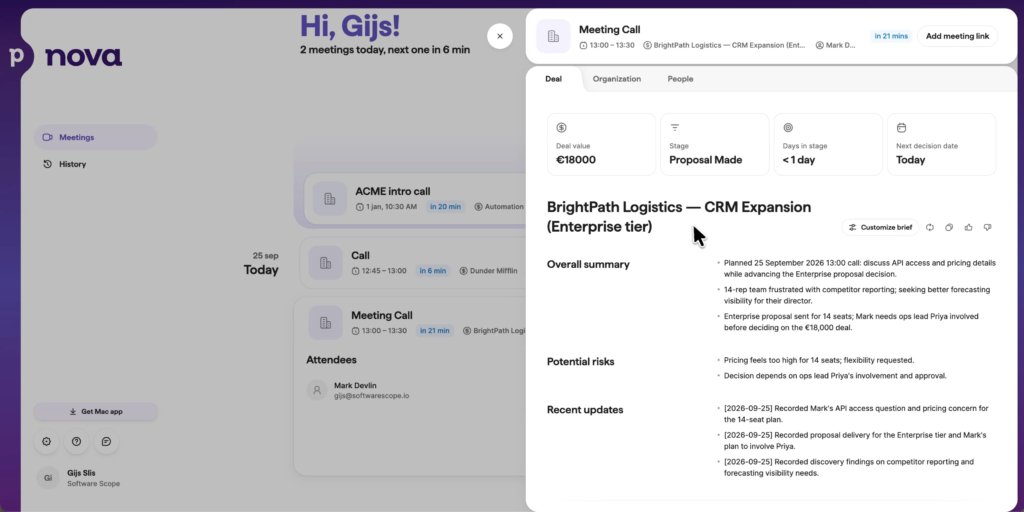
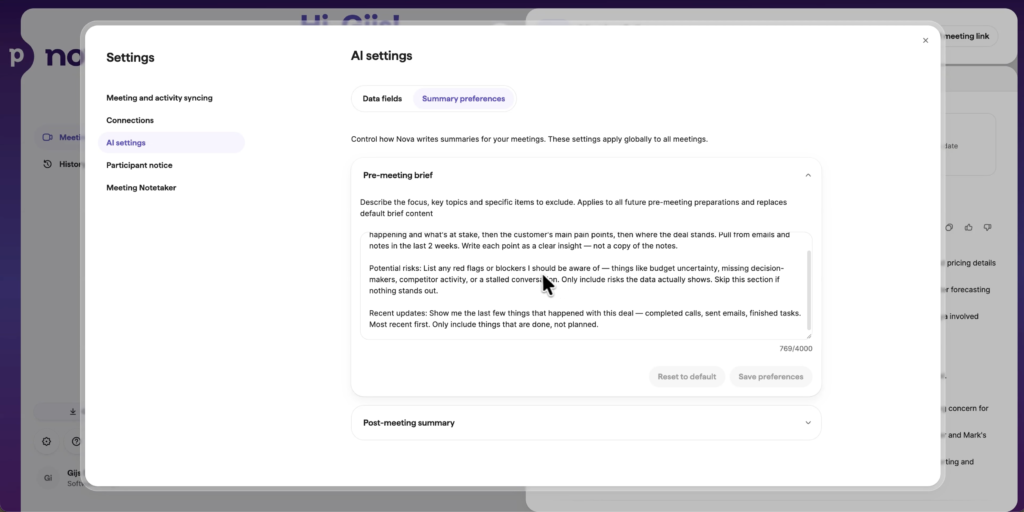
I didn’t set anything up for this. If you want to change what the brief focuses on, use the Customize brief panel in the deal overview and type your instructions in plain language; they apply to all future meetings on that deal. Honestly, this alone replaces the five minutes you’d usually spend digging through old notes right before a call.
Stage 2: recording the call
Next I ran a real demo call and let Nova capture it. There are two ways to do this:
- The AI notetaker joins your call as a visible participant. It works in Google Meet, Zoom and Microsoft Teams.
- The Nova Companion desktop app, for Mac and Windows, records the audio straight from your computer, so nobody joins the call at all. That also means it isn’t limited to video calls; it can capture calls in other apps, like VoIP calls.
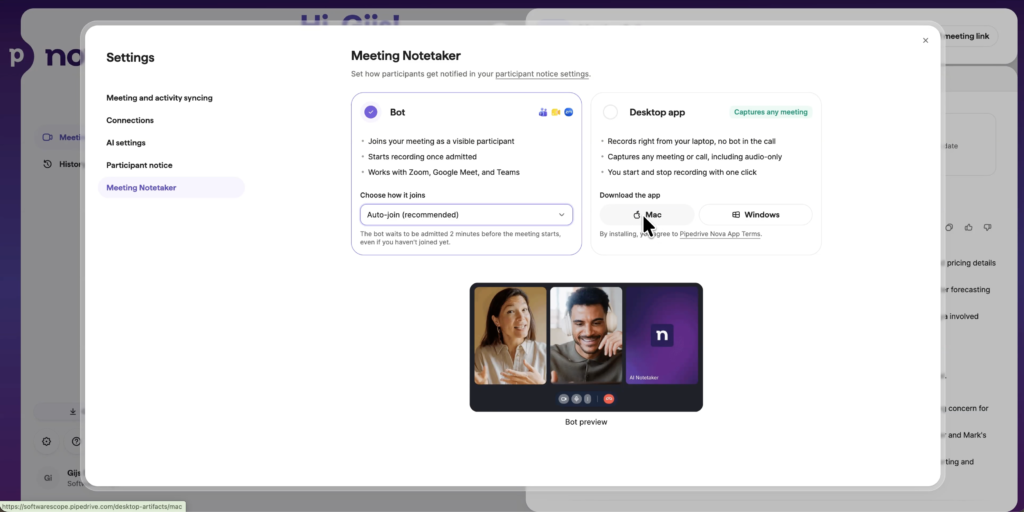
I think more teams will lean toward the desktop app, and that’s what I used in the demo. Nothing joined the meeting; you just talk normally while Nova captures everything in the background, so you can focus on the person you’re talking to instead of typing notes.
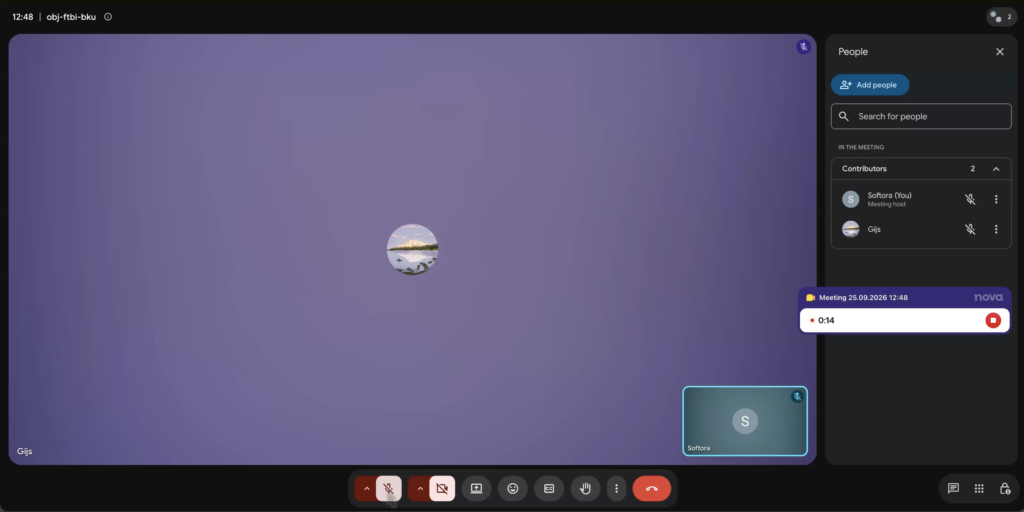
A note on consent. Depending on where you are, you may need consent before recording someone. Nova has participant notices built in, which are off by default and set up under Settings. You can choose no automatic notice, a notice with an option to opt out, or required consent. Nova can email the consent request automatically, 24 hours before the meeting by default, or give you a link to share. But the responsibility for following the law, and respecting what participants choose, is yours as the host.
Stage 3: the debrief and CRM updates
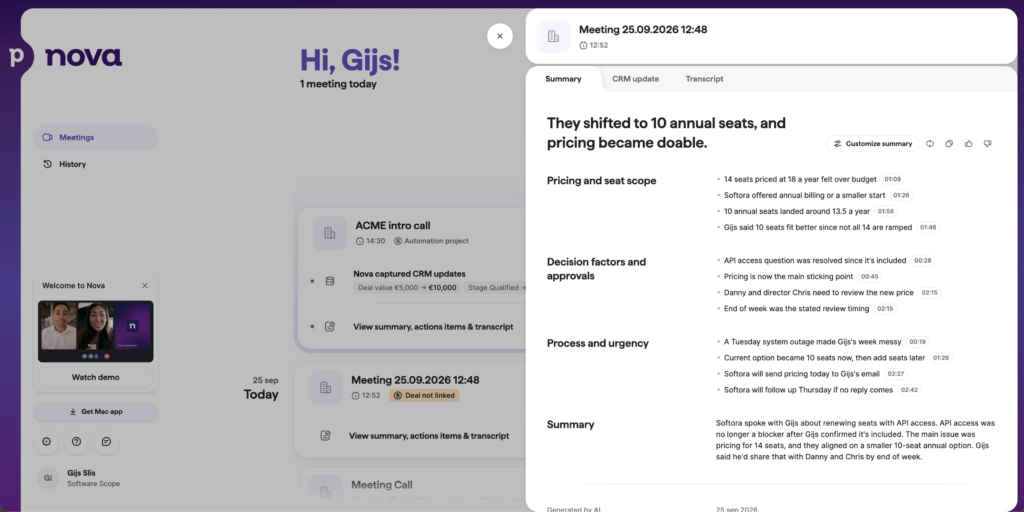
Once the call ended, Nova had produced:
- A summary, key takeaways and recommended next steps, which you can save as a note on the deal
- The full transcript, with timestamps, so you can click an action item and jump to that exact moment in the call
- Suggested CRM updates
The suggested CRM updates are the part I think matters most. Nova suggests changes to deal fields, contact details and notes, like the deal stage, value or expected close date, but it doesn’t save any of them automatically. It shows each suggestion right next to the current value in Pipedrive, and you approve it, edit it or skip it. Nothing touches your pipeline until you say so.
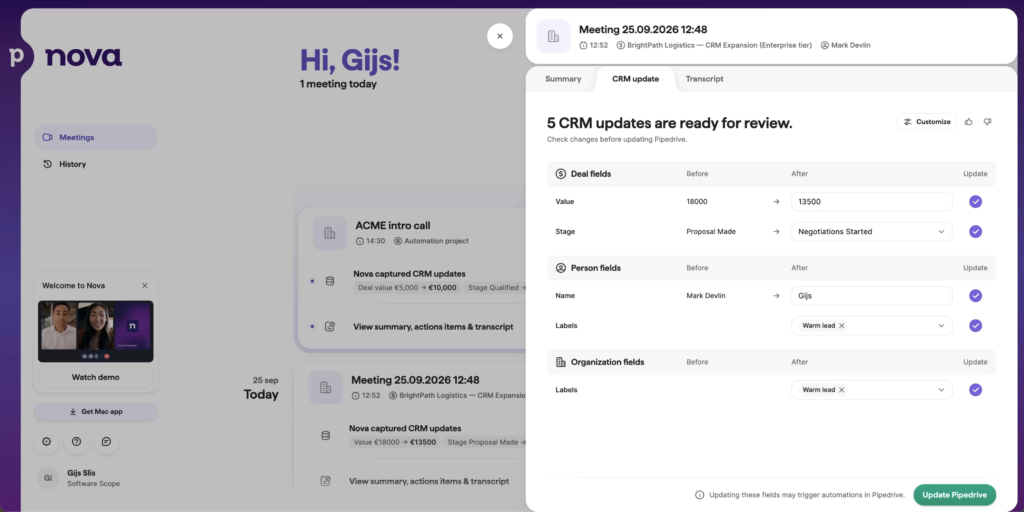
That gives you a complete, accurate pipeline without the manual work, and it means the brief for your next call with that person already contains everything from this one.
Who should turn on Nova (and who shouldn’t)
I think this is one of the best uses of AI I’ve seen in sales. If you do sales calls or online meetings, whether on Zoom, Google Meet or Teams, I’d turn it on without hesitation.
Think about where your time goes right now. After every call you write notes, update fields and hope you remembered everything. Or you already use a separate AI notetaker, which means paying for another subscription and still moving everything back into Pipedrive by hand. Nova gives that time back, so you can spend it on what grows your pipeline: following up faster, staying in touch at the right moment, and reaching new leads while they’re still warm.
If your selling mostly happens in person, like a car salesperson working the lot, Nova won’t be nearly as valuable. It’s built around the call, so if calls aren’t a big part of your job, much of what makes it useful doesn’t apply to you.
Pricing and free trial
Nova doesn’t cost anything extra: it’s included on every Pipedrive plan, with no setup required. You pay for your Pipedrive plan as usual, and Nova comes with it.
Through my link you get a 30-day free trial, instead of the usual 14 days, and 20% off your first year, so you can test Nova on your own deals before you pay anything.
Verdict
Pipedrive Nova does three things well: it briefs you before the call, records it without anyone noticing, and drafts your CRM updates afterwards, while still waiting for your sign-off before anything changes. It isn’t doing your job for you. It clears the tedious admin off your plate so you have more time to sell, and since it’s included in every plan, there’s little reason not to try it if you’re on calls every week.
FAQ
What is Pipedrive Nova?
Pipedrive Nova is an AI meeting intelligence tool built into Pipedrive. It creates a brief before your call, records and transcribes the call, and afterwards writes a summary, next steps and suggested CRM updates for you to approve.
Is Pipedrive Nova free?
Nova is included on all Pipedrive plans at no extra cost. You only pay for your Pipedrive plan.
Does Pipedrive Nova work with Zoom, Google Meet and Teams?
Yes. The AI notetaker can join Zoom, Google Meet and Microsoft Teams calls. If you don’t want a bot in the call, the Nova Companion desktop app for Mac and Windows records the audio from your computer instead.
Does Nova update my CRM automatically?
No. Nova suggests updates to deal fields, contact details and notes, and shows each one next to the current value. You approve, edit or skip each suggestion, and nothing is saved until you do.
How do I handle recording consent with Nova?
Nova has built-in participant notices: no automatic notice, a notice with an opt-out, or required consent, sent by email or as a shareable link. They’re off by default, and as the host you’re responsible for following the recording laws where you and your participants are.
Is there a Pipedrive free trial?
Yes. Through my link you get a 30-day free trial and 20% off your first year.
Related articles
-
GoHighLevel Alternatives (2026): 5 Tools I Tested, Ranked
The best GoHighLevel alternative I tested is Perspective, especially if your funnels are the problem you’re trying to solve. It’s a mobile-first…