
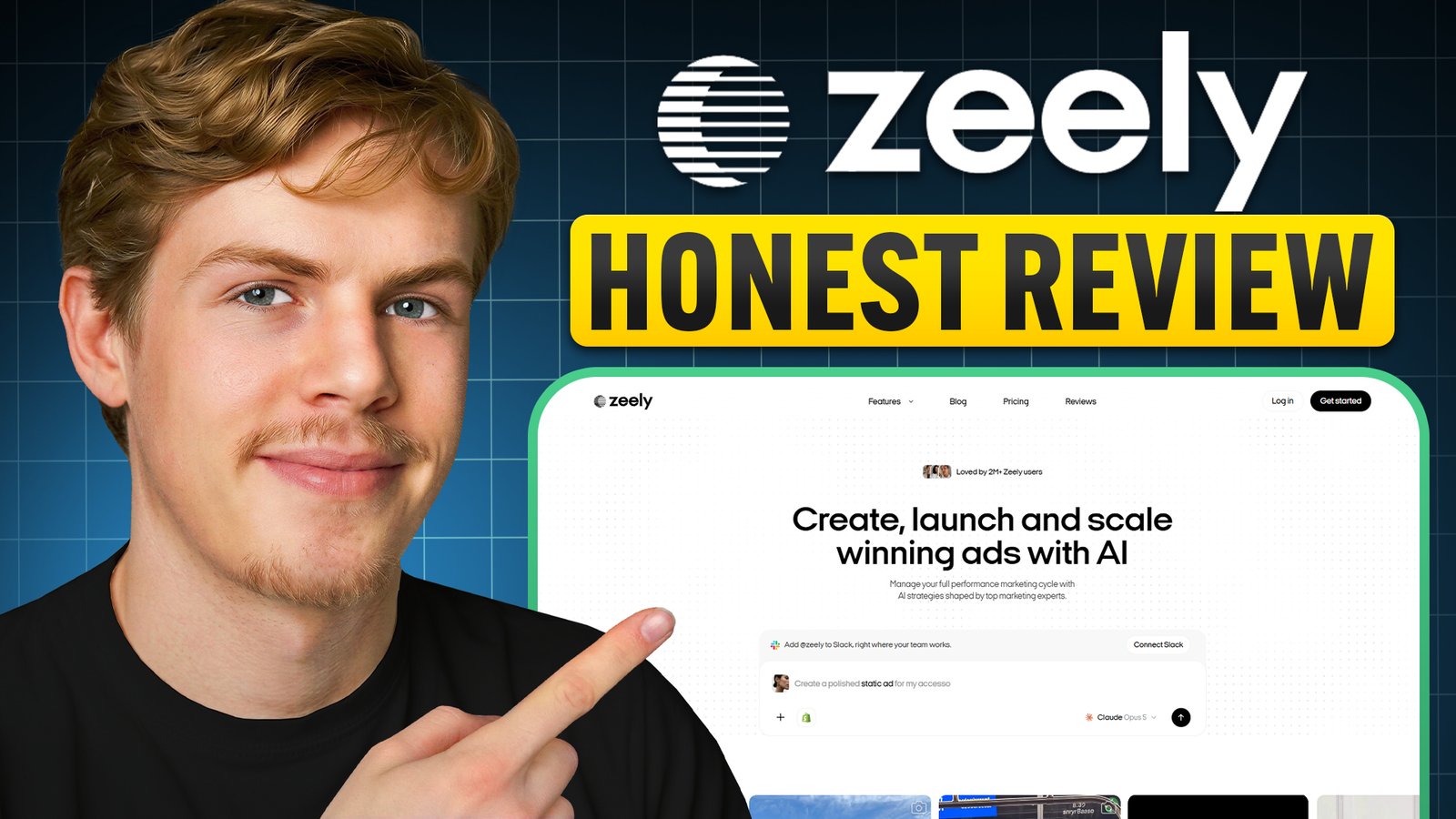
Zeely sponsored the video this guide is based on, and the Zeely links on this page are affiliate links: if you sign up through them I may earn a commission, at no extra cost to you. I agreed to the sponsorship on the condition that I could be completely honest about the product, and the pros and cons below are my own.
Your ad creatives are the single biggest factor in how profitable your ads are, and they’re also the hardest part to get right. You need new images, video variations, UGC videos, different hooks and offers, and ideally more than one angle to see what actually performs. Making all of that takes a lot of time, especially without a designer, editor or creative team.
In this guide I’ll show you how to use Zeely AI to create image ads and UGC-style video ads, for both a physical product and a service business, and share the honest pros and cons I found while testing it.
Quick answer
Zeely AI creates image ads and UGC-style video ads from your product or service page. The workflow comes down to these steps:
- Set up your Brand DNA (logo, colors, fonts, tone)
- Add your products or services from a link
- Create image ads from a reference ad
- Edit the text and visuals of the best variations
- Create a UGC-style video ad from a template and avatar
- Pick Kling or Seedance to turn it into a video
My verdict: the image ads are really good and the fastest way to get lots of variations. The video ads are realistic, but you can’t upload your own video as a reference.
7 days free through my link.
Rather watch than read?
I go through the whole workflow in the video below, including the finished video ads.
What is Zeely AI?
Zeely AI is an AI ad creation platform. You give it your brand and your product or service, and it generates image ads, UGC-style video ads with AI avatars, and organic content. You can also connect it to your Meta account and manage your campaigns from inside Zeely.
It’s built for businesses that want to test a lot of creatives without a designer, editor or film shoot for every variation.
Step 1: Set up your Brand DNA
Start in the Brand DNA section. This is where you set up your brand: your logo, website, a brand overview (a few keywords and values), your colors, fonts, tagline and tone of voice.
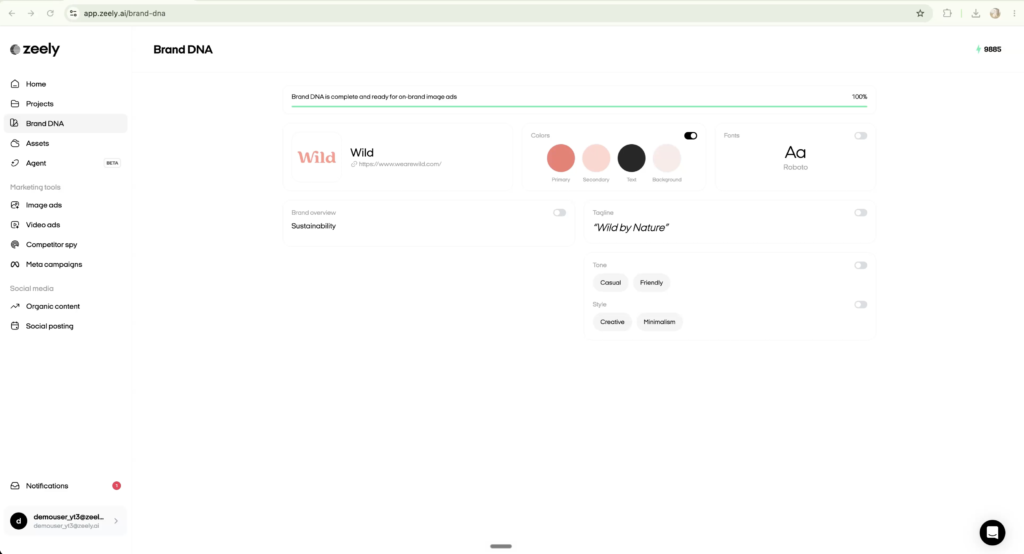
When you create an ad later, you choose which of these to apply, so everything stays on brand. It’s worth filling in properly once, because every ad you make afterwards can use it.
Step 2: Add your products or services
Go to Assets and click New product. Paste a link to your product page and click Generate from link. Zeely analyzes the page, pulls in the product images and works out what the product is.
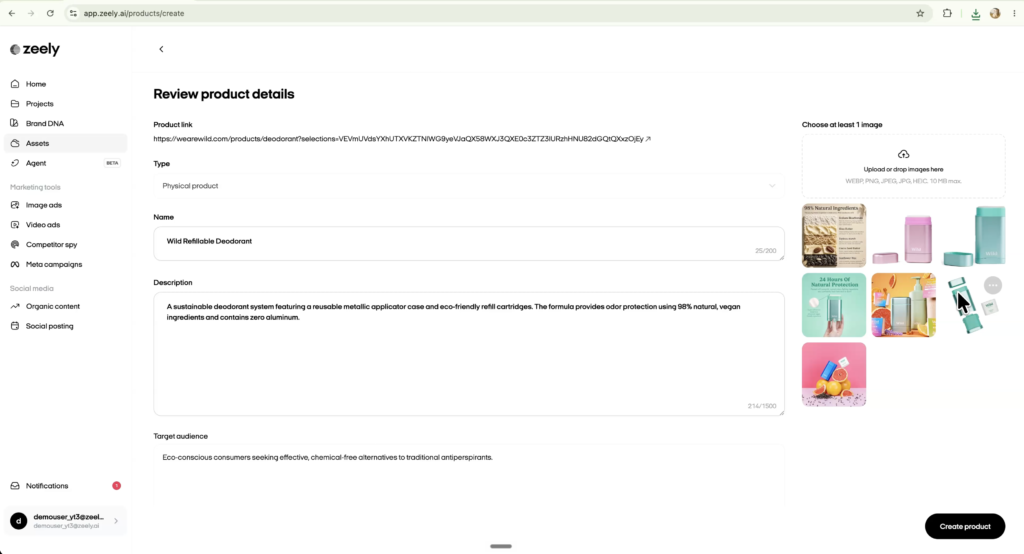
Click Continue and you’ll see the name, description and target audience it generated, which you can edit or regenerate. Then:
- Price: set the price and an optional sale price.
- Call to action: Shop now is recommended for products. For a service, Learn more or Get offer usually fits better.
- Images: if the page only had one image, click Upload or drop images to add more, so you have more to work with in your ads.
For a service business it works the same way, but you often don’t have product images. Paste the link to your service page and pick the images that show the actual service or its result. For a visual service like teeth whitening there are usually before and after photos; for something like landscaping, a before and after or an end-result photo works well. You can also upload your own images.
Step 3: Create an image ad
Go to Image ads, click Create new in the top right and choose Image. You can make a normal image ad, clone another ad, or use the playground. For a normal image ad, you set up the following.
- Context: select the product the ad is for.
- Image: pick the product image to include. You can continue without an image and let the AI decide how to visualize your offer, which can work for a service, but for a physical product I wouldn’t.
- Reference: the ad the AI uses as inspiration. You can pick one from Zeely’s library of close to 3,000 ads (filter by product or service, concept and niche), upload a competitor’s ad, or continue without a reference.
- Prompt: optional extra instructions, like ad copy ideas. If you want the result to stay close to the reference, say so here (more on that below).
- Brand DNA: choose which parts to apply. I’d at least turn on the brand overview and tone, and probably your colors, so the AI knows what your brand is about. Turning off fonts and tagline gives it more creative freedom.
- AI model: GPT Image 2 or one of the Nano Banana models. Nano Banana Pro is pretty good, but for image ads I think GPT Image 2 is worth the small extra cost.
- Variations: how many versions to make, and what they should differ in: text, visual, audience, style or composition. Text is the recommended option.
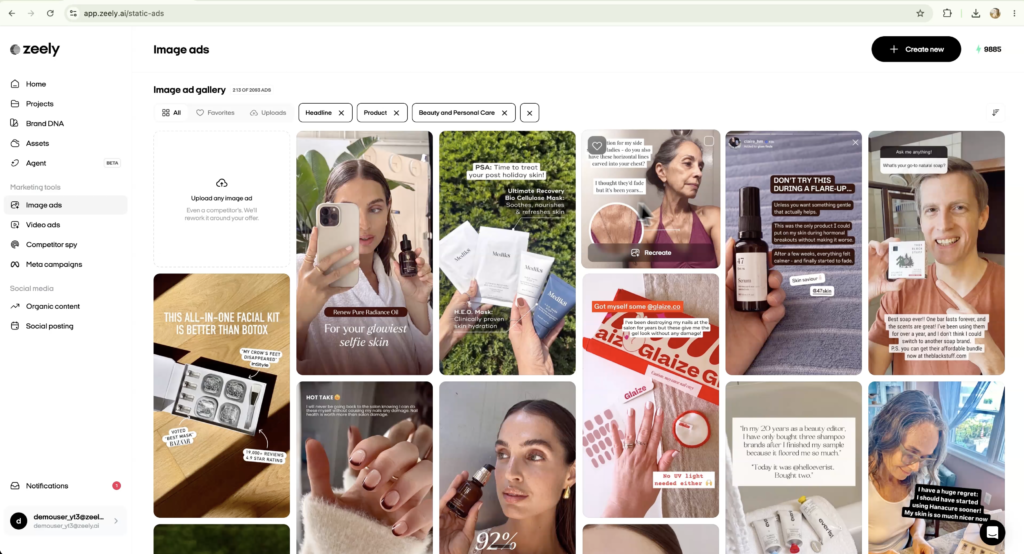
Click Generate. A couple of minutes later I had three variations, each with different headlines and copy, and they looked great. They weren’t very close to the reference ad, though, because I hadn’t asked for that.
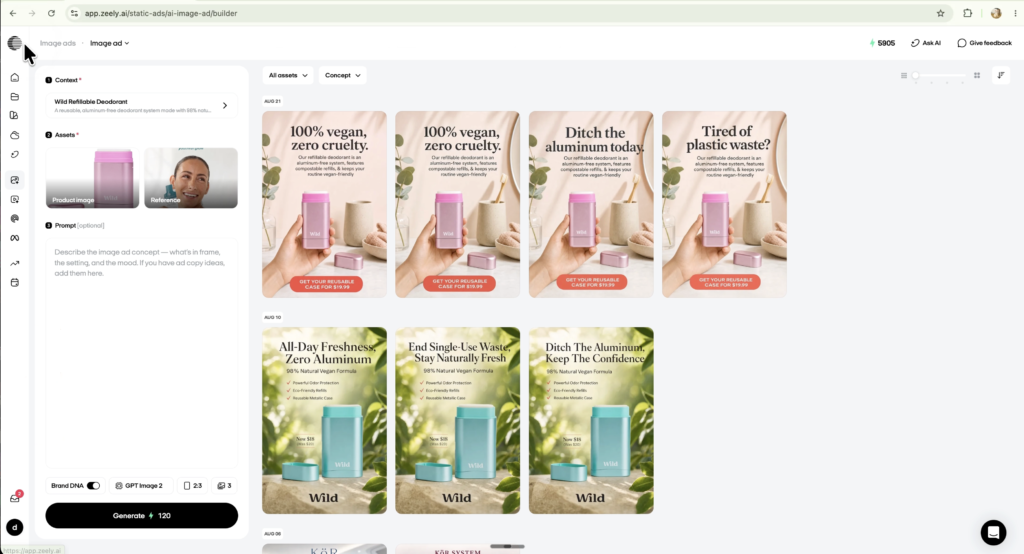
Step 4: Edit your image ads
You don’t have to accept an ad as it comes out. Two edits you’ll use a lot:
- Change text: click any text on the ad and type what you want it to say.
- Change a visual: describe the change, for example “remove the toothbrush in the background”, and regenerate. This edit is free, and in my test the toothbrush was gone in the next version.
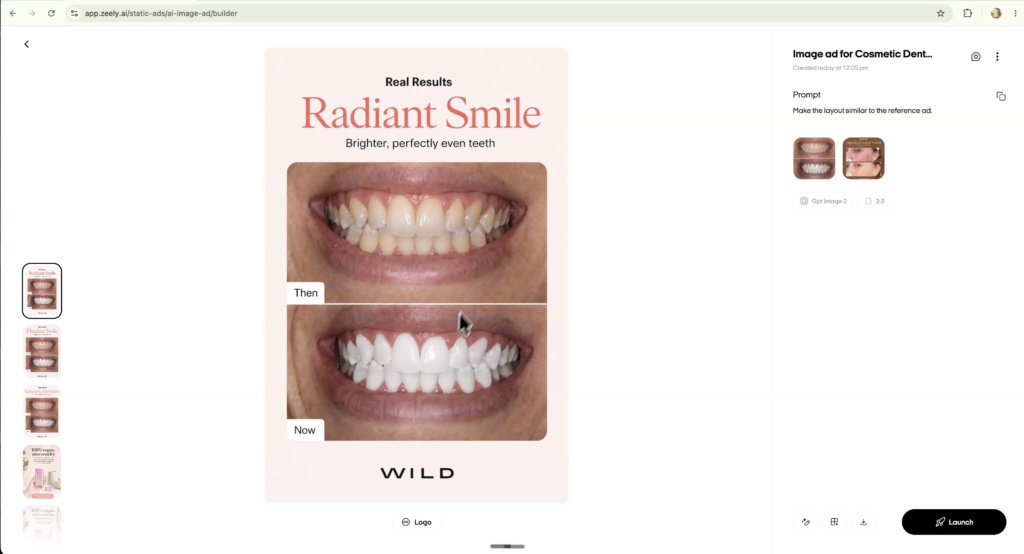
Image ads for a service. For the teeth whitening service, I uploaded one combined before and after image, set the library filter to Service and picked a reference with a format I liked. This time I added the prompt “make the layout similar to the reference ad”, and it did: the result followed the reference layout closely, with my image in it. When you review your ads, check three things: does the layout look good, is it eye-catching, and does the text make sense? If not, edit it.
Step 5: Create a UGC-style video ad
Video is much harder to get right, because your product has to stay recognizable while someone is talking and moving around. Click New video and choose Video ad. (You can also make a talking head video, use the playground or animate an image.)
- Product and image: select the product and the image to use.
- Reference: pick a template from the library, filtered by what you want to do, like a product showcase. There are templates for jewelry, skincare and many other product types, and they look very realistic.
- Avatar: the template comes with an avatar, but you can pick another one, or create your own by uploading a photo, for example of yourself, to appear in the ad.
- Description: optionally describe the avatar’s look, outfit, background, script, emotional tone, gestures and movement. You can also leave it blank.
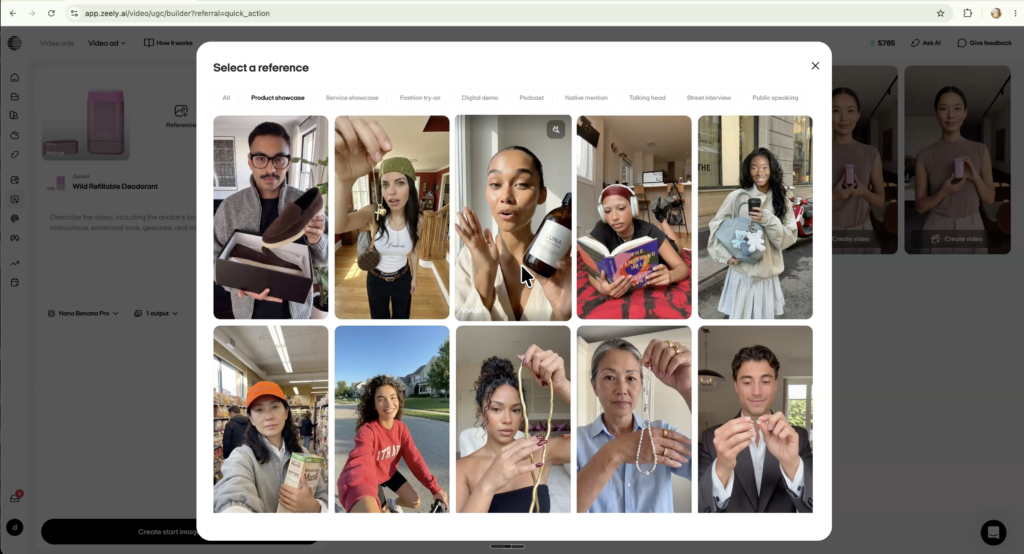
Zeely first creates a starting image, and the video is made from that. For this starting image I recommend Nano Banana Pro: for real-world visuals like this it’s more than good enough. I ran it once with the description blank and once with specific instructions. The blank one stayed much closer to the template; the one with instructions looked better to me.
The biggest limitation: for image ads you can upload your own reference, but for video ads you can only pick from the library. The library is extensive, so it isn’t a huge problem, but you can’t upload a video ad you want to recreate.
Step 6: Turn it into a video with Kling or Seedance
Select the starting image you like most and click Create video. You can generate the full video ad, or the hook and the body separately.
- Model: Kling or Seedance 2.0. Seedance is the more realistic model, but Kling handles people talking well, and it costs a third of the credits (500 versus 1,500 per video).
- Script: use the AI-generated hook and body, regenerate them, or write your own. Under Prompt you can describe what should happen in the video.
- Audio: pick a voice style (natural, clear, bright, warm and others, or auto), plus the emotion and accent if you want to control them.
- Captions: turn them on or off, and choose a style for the hook headline.
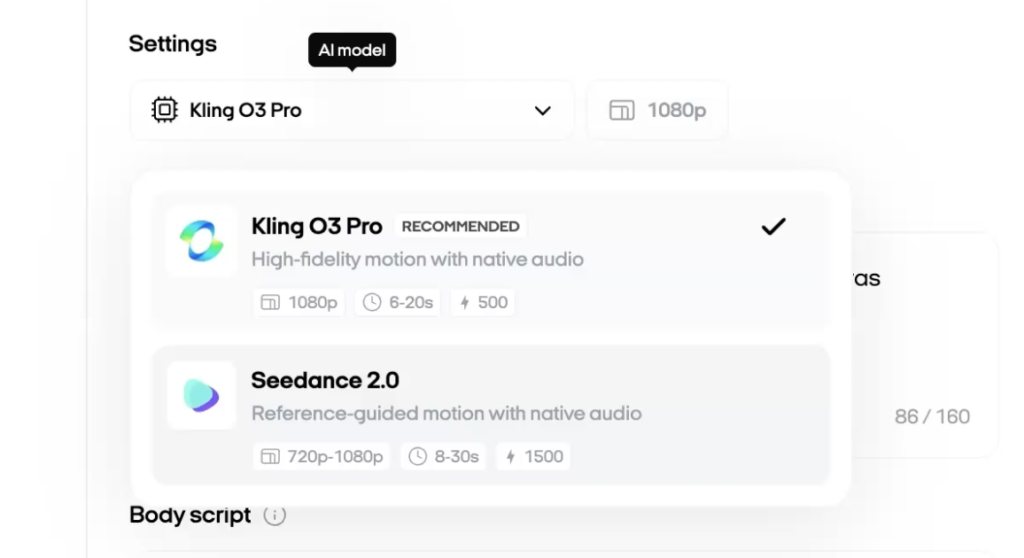
Kling vs Seedance, same script. I made the same deodorant ad with both models. In both, the face, voice and hand movements looked realistic and natural. Kling’s version had a problem, though: the cap started out right and then changed shape during the video. Seedance kept the product consistent, and was clearly the better of the two. (Neither knew this deodorant’s cap slides off rather than twists; you’d need to add that as an instruction.)
A service ad without a product image. For the teeth whitening service I removed the image, picked a template set in what looked like a dental office, and just described the video. Service references are harder to find than product ones, but the result was very realistic in both voice and face, and very usable as a UGC ad. It was the one I was most impressed by.
My rule of thumb: if there’s a lot of movement and the product has to stay consistent, pay the extra for Seedance. If it’s mostly a talking head, use Kling and save your credits.
Other Zeely features
Once you have your creatives, you can connect Zeely to your Meta account and manage your campaigns from inside Zeely. There’s also organic content creation, social posting, a Competitor Spy tool and an AI agent. I focused my testing on image and video ad generation, so I haven’t tested these in depth.
Zeely AI pros and cons
Pros
- The image ads look really good, and you get multiple variations in a couple of minutes.
- Editing text and regenerating visuals is easy, and visual edits are free.
- The reference library is large, with close to 3,000 image ads, and it works for services as well as products.
- The UGC video ads are realistic in face, voice and movement.
- Brand DNA keeps every ad on brand without setting it up each time.
Cons
- You can’t upload your own video as a reference for video ads, only for image ads.
- With Kling, the product can change shape during the video; Seedance fixes that but costs three times the credits.
- Video references for services are more limited than for products.
- Image ads don’t follow the reference closely unless you ask for it in the prompt.
Zeely AI pricing
Zeely works with monthly credits. All plans include image ads, video ads, Meta campaigns, organic content, the AI agent, Competitor Spy and Brand DNA; the difference is how many credits you get.
| Plan | Price | Credits per month |
|---|---|---|
| Starter | $29.95/mo | 2,500 |
| Plus | $49.95/mo | 5,000 |
| Growth | $79.95/mo | 10,000 |
To put the credits in perspective: in my test a Kling video cost 500 credits and a Seedance video 1,500, so the Starter plan covers about five Kling videos or one Seedance video, plus image ads. If you plan to make a lot of video, look at the bigger plans.
If you run your Meta campaigns through Zeely, there’s also a service fee of 12% of your ad spend, on top of the ad budget you pay Meta. An optional Booster add-on ($39.95 per year) lowers that fee to 6%. If you only use Zeely to make creatives and run your ads in Meta yourself, this doesn’t apply.
Prices from Zeely’s own pricing overview, checked on September 29, 2026. Check the current prices before you buy.
Is Zeely AI worth it?
The workflow is straightforward: add your business, pick a creative direction, generate multiple options, edit the strongest ones, and create video versions when you need them. I’d start with the image ads, because that’s where you get the most variations quickly. The video side is useful for testing UGC-style creative without filming everything yourself, with the limitation that you can’t upload your own video reference.
I’d recommend Zeely if you already test a lot of creatives and spend a lot of money producing them, or if you want to test more creatives because you’re scaling your business through paid ads.
FAQ
What is Zeely AI?
Zeely AI is an AI platform for creating ad creatives. It generates image ads and UGC-style video ads with AI avatars from your product or service page, and it can manage your Meta ad campaigns.
Does Zeely AI have a free trial?
Yes. Through my link you get 7 days of Zeely for free.
How much does Zeely AI cost?
Plans start at $29.95 per month for 2,500 credits, with Plus at $49.95 for 5,000 and Growth at $79.95 for 10,000. If you run Meta campaigns through Zeely, there’s also a 12% service fee on ad spend, or 6% with the Booster add-on.
Can Zeely AI make ads for a service business?
Yes. You add a service from its page link and use before and after or result photos, or no image at all. In my test, a UGC video ad for a teeth whitening service came out very realistic. There are fewer video templates for services than for products, though.
Kling or Seedance: which should I use in Zeely?
Use Seedance when there’s a lot of movement and the product has to stay consistent; it’s more realistic but costs 1,500 credits per video. Use Kling for mostly talking-head videos; it handles speech well and costs 500 credits.